

How to Warm Up Email Domain: Step-by-Step Guide for 2026
By Mozaherul Islam | SEO Professional and Digital Marketer | Techlanso.com| Published 2026
Learning how to warm up email domain is the first step every cold emailer must take before sending a single campaign message. You set up a new email account, load your lead list, and start your first cold outreach campaign. Within 48 hours, open rates are near zero and Google has flagged your domain. Your campaign is dead before it started. What went wrong?
Almost certainly, you skipped email warm-up. It is the most overlooked step in cold email deliverability.
In 2026, inbox providers like Google, Microsoft, and Yahoo use AI filters that are more strict than ever. A new domain that sends hundreds of emails in its first week looks like spam. The email warm-up process fixes this. It teaches inbox providers, over two to four weeks, that your domain sends real messages that real people want to read.
This guide covers everything you need to know about how to warm up email domain properly. It explains what email warm-up is, the step-by-step process, the best warm-up tools in 2026, a day-by-day ramp-up schedule, common mistakes, and how warm-up fits inside a full AI lead generation workflow.
How to Warm Up Email Domain: What It Is and Why It Matters
Email warm-up is the process of slowly raising the number of emails sent from a new or inactive email account. When you learn how to warm up email domain correctly, you avoid spam filters and protect your sender reputation. This happens over a set period, usually two to four weeks, before that account is used for cold outreach campaigns.
Here is how it works. You start by sending a small number of emails each day, between 5 and 10. These go to a network of real or managed accounts. Those accounts open the emails, reply to some, and move any that land in spam back to the inbox. Each week, you raise the daily volume on a ramp-up schedule. By the end, your account looks like a normal human sender to inbox providers.
This record is called your sender reputation. It is also known as a sender score or domain health score. A strong sender reputation means your cold emails land in the inbox. A weak one means they go to spam or get dropped before delivery.
Email warm-up is not optional. It is a core requirement recognized by Google’s own bulk sender guidelines, which were updated in 2024 and remain the standard in 2026.
Key Definition: Email warm-up builds your sender reputation by slowly raising send volume and creating positive engagement signals before you run cold outreach at scale.
Why You Need to Know How to Warm Up Email Domain in 2026
Email deliverability has become harder to maintain in 2026. Knowing how to warm up email domain is no longer optional for anyone running cold outreach. Google and Microsoft both updated their spam filters in 2024. The 2026 version of those filters is more precise. They look at send volume, content patterns, engagement signals, header data, domain age, and IP history.
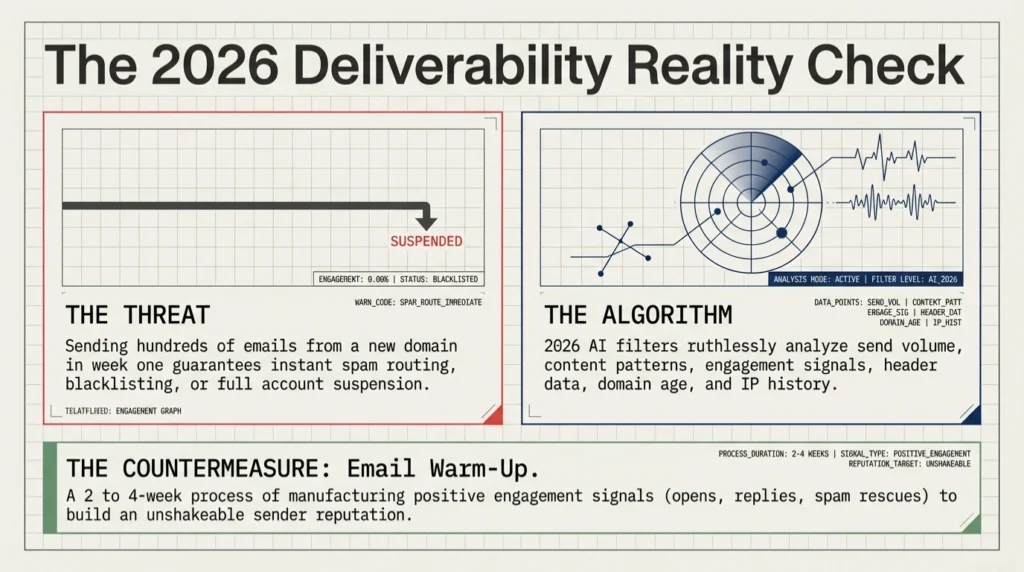
The result is a harder environment for cold emailers. Senders who skip warm-up face worse problems than they did two years ago. These include instant spam routing, domain blacklisting, and full account suspension. A warmed domain with proper email authentication records always outperforms an unwarmed domain, no matter how good the email copy is.
Without warm-up, these are the most common outcomes cold emailers see in 2026:
- Emails go to spam or promotions folders with no inbox delivery
- Bounce rates spike above 5%, which triggers domain health penalties
- Domain gets added to blacklists like Spamhaus or Barracuda, often with no easy fix
- Gmail or Outlook accounts get suspended and require a full reset
- Reply rates stay near zero because no one receives the campaign
To understand why warm-up works, you need to know what inbox providers are measuring. The next section explains the difference between IP reputation and domain reputation. Both matter for your cold email deliverability.
IP Reputation vs Domain Reputation: What You Are Building
Most senders think of email deliverability as one score. In reality, inbox providers look at two separate signals. The first is the IP address your emails come from. The second is the domain name in your From address and links.
IP Reputation
IP reputation is tied to the server IP your emails originate from. If you use Gmail or Outlook, you send from Google’s or Microsoft’s shared IP infrastructure. These IPs have strong reputations. That is one reason Gmail accounts are popular for cold email. But even with a strong IP, a weak domain reputation can still hurt deliverability.
Domain Reputation
Domain reputation is tied to the domain in your From address and your email links. This is the main reputation you build during warm-up. Google weights domain reputation heavily in Gmail’s filtering. A new domain, registered in the last 30 to 90 days, has zero domain reputation. That absence of history alone is enough to trigger spam routing.
Shared IP vs Dedicated IP
If you use a custom SMTP provider like SendGrid, Mailgun, or AWS SES, you may be on a shared IP pool or a dedicated IP. Shared IPs carry the combined reputation of all senders on that pool. Dedicated IPs start fresh. That means they need their own warm-up process, separate from domain warm-up. For most cold emailers in 2026, Gmail or Outlook accounts with custom domain aliases are the most practical setup. They avoid the dedicated IP complexity while keeping strong deliverability.
Email Authentication: SPF, DKIM, DMARC, and BIMI Explained
Before you warm up any email account, your domain needs the right authentication records. Authentication is not optional. It is the base requirement for inbox providers to treat your domain as trustworthy. Missing records make warm-up less effective, no matter how long you run it.
| Protocol | What It Does | Why It Matters for Warm-Up |
|---|---|---|
| SPF | Tells inbox providers which servers can send email from your domain | Without SPF, many inbox providers route your emails to spam by default, even during warm-up |
| DKIM | Adds a digital signature to prove emails were not changed in transit | DKIM is required by Gmail’s bulk sender policy. Missing it reduces trust signals a lot |
| DMARC | Sets rules for emails that fail SPF or DKIM and sends reports to the domain owner | DMARC stops domain spoofing and shows inbox providers you are a responsible sender |
| BIMI | Shows your brand logo in the Gmail inbox next to your sender name | Optional but boosts open rates and brand trust. Requires DMARC at enforcement level (p=quarantine or p=reject) |
Set up SPF, DKIM, and DMARC through your domain registrar or DNS provider before you connect any account to a warm-up tool. Google has a step-by-step email sender guidelines reference for configuring these records.
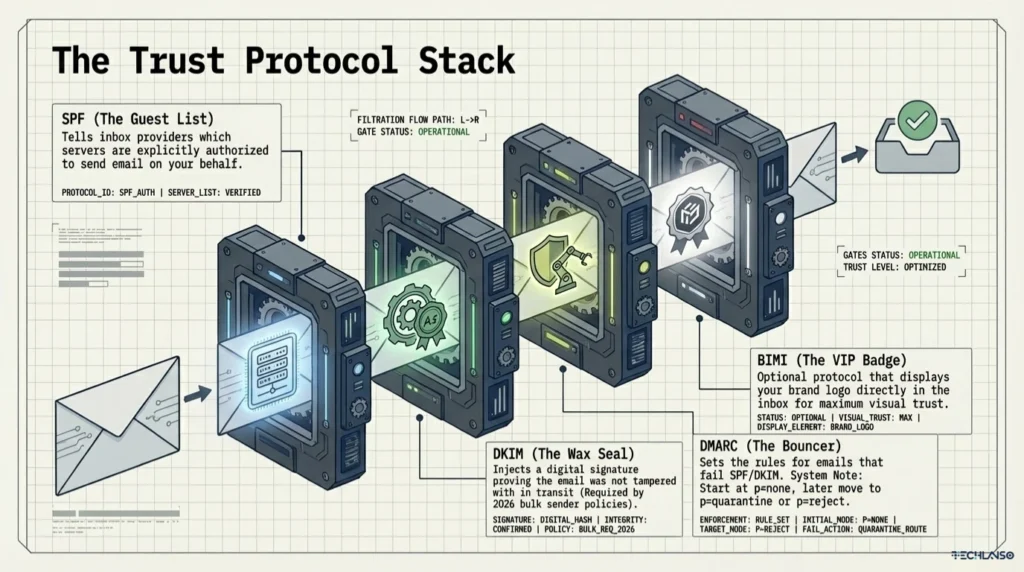
Important: Set DMARC to at least p=none to start. Move to p=quarantine or p=reject after warm-up is complete and you have confirmed SPF and DKIM are passing in your postmaster reports.
How to Warm Up Email Domain: Manual vs Automated Tools
There are two ways to warm up email domain. You can do it manually or use a dedicated automated warm-up tool. Knowing how to warm up email domain using the right method helps you pick the best approach for your volume and timeline.
Manual Warm-Up: How to Warm Up Email Domain Without Tools
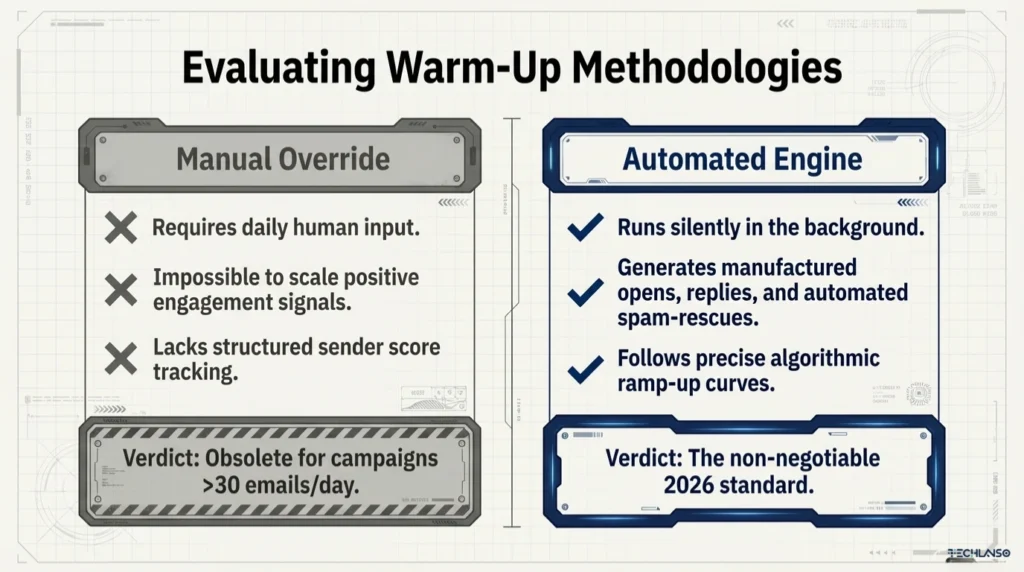
Manual warm-up means sending real emails from your account each day to real contacts. You slowly raise the volume over several weeks. You rely on those contacts to open, reply, and engage. This can work at very low volumes, but it has real limits.
- Requires daily action from the sender with no automation
- Hard to get enough positive engagement signals at the volume needed
- No structured ramp-up reporting or sender score tracking
- Most senders rush campaigns too early because they underestimate the time needed
Automated Tools: The Best Way to Warm Up Email Domain at Scale
Automated email warm-up software connects to your account and runs the entire process for you. The tool sends and receives emails within its own network of managed accounts. It creates consistent positive engagement signals, including opens, replies, and inbox rescues from spam, on a daily schedule that follows a proper ramp-up curve.
- Runs fully in the background with no daily effort needed
- Follows a structured ramp-up schedule built for inbox provider thresholds
- Creates consistent engagement signals that manual warm-up cannot match at scale
- Most tools include sender score dashboards and inbox placement tracking
- Best practice is to keep automated warm-up running alongside live campaigns, not just before launch
Verdict: For anyone running outreach at more than 30 emails per day, an automated warm-up tool is the only practical choice. Manual warm-up cannot meet the engagement signal requirements of modern inbox filters.
Best Email Warm-Up Tools in 2026: Full Comparison
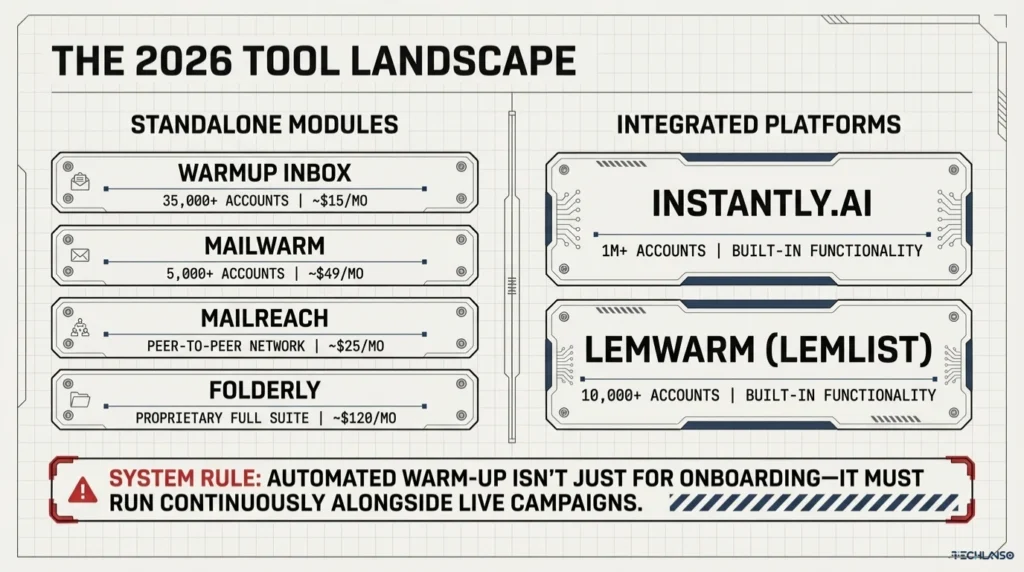
Several dedicated warm-up tools and outreach platforms with built-in warm-up features are available in 2026. Whether you are just learning how to warm up email domain or scaling to multiple accounts, the table below compares the most widely used options across the features that matter most for cold email deliverability.
| Tool | Network Size | Type | Continuous Warm-Up | Inbox Monitoring | Free Plan | Starting Price |
|---|---|---|---|---|---|---|
| Warmup Inbox | 35,000+ accounts | Standalone | Yes | Yes | No | ~$15/mo |
| Mailwarm | 5,000+ accounts | Standalone | Yes | Limited | No | ~$49/mo |
| Lemwarm (Lemlist) | 10,000+ accounts | Built into Lemlist | Yes | Yes | No | Included in Lemlist plan |
| Instantly.ai | 1M+ accounts | Built into Instantly.ai | Yes | Yes | No | Included (~$37/mo) |
| Mailreach | Peer-to-peer | Standalone | Yes | Yes (Spam test) | No | ~$25/mo |
| Folderly | Proprietary | Standalone | Yes | Yes (Full suite) | No | ~$120/mo |
For this guide, Warmup Inbox and Mailwarm are referenced as standalone tools. If you use Instantly.ai for high-volume cold email, its built-in warm-up network is one of the largest available. It removes the need for a separate tool.
If you run outreach on a full AI platform like Outrich, you connect your pre-warmed accounts to Outrich’s round-robin sending system. Outrich handles lead enrichment, AI email writing, sequences, and reply management. But it works best when your sending accounts have been properly warmed first.
| Ready to run outreach that lands in the inbox? See how Outrich handles AI enrichment, email writing, and multi-account sending Get access to Outrich here |
How to Warm Up Email Domain: 9 Steps in the Right Order
Follow these nine steps in order before running any cold outreach campaign. This is the complete process for how to warm up email domain for a new or inactive sending account in 2026.
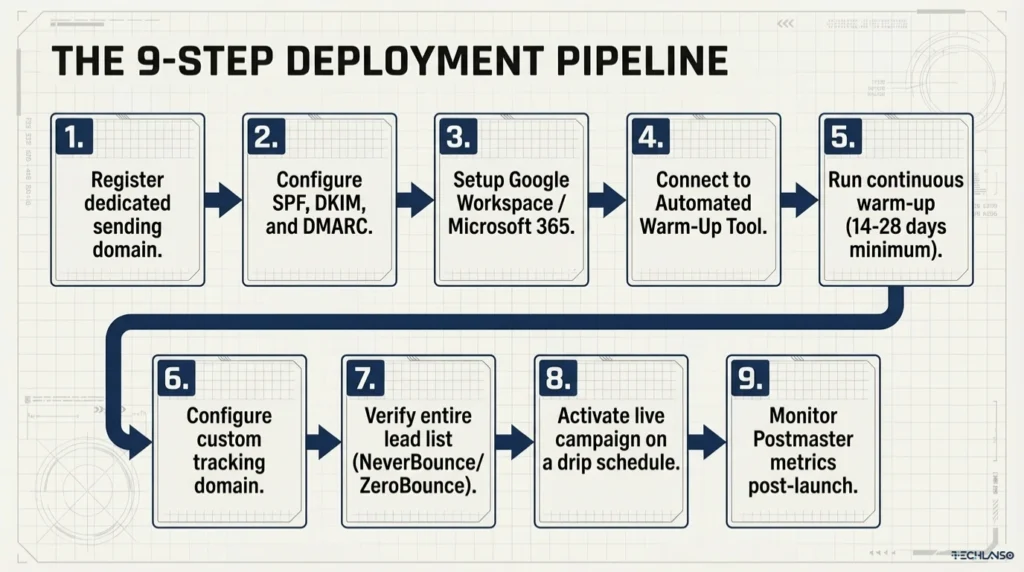
Step 1: Register a Sending Domain Separate From Your Main Business Domain
Never use your primary business domain (yourcompany.com) for cold email campaigns. Register a dedicated sending domain such as mail-yourcompany.com or yourbrand-hq.com. If something goes wrong with a spam complaint or a blacklisting, your main domain stays clean. This is a non-negotiable best practice for B2B email domain warm-up in 2026.
Step 2: Configure SPF, DKIM, and DMARC on Your New Domain
Add SPF, DKIM, and DMARC records to your domain DNS before sending a single email. Without these records, warm-up cannot work well. Your domain registrar, such as Namecheap, GoDaddy, or Cloudflare, will have a DNS panel where you add these as TXT entries.
Step 3: Set Up a Professional Sending Email Account
Create a professional email account on your new domain using Google Workspace or Microsoft 365. Avoid free Gmail or Hotmail accounts for cold outreach. They lack the deliverability controls that professional accounts provide. Add a profile photo, a clear email signature, and complete your account profile.
Step 4: Connect to a Warm-Up Tool and Set Your Ramp-Up Schedule
Connect your new email account to your chosen warm-up tool. Set the ramp-up schedule. See Section 8 for a full day-by-day plan. Set the tool to run warm-up continuously, not just for the startup period, but alongside your future campaigns as well.
Step 5: Run Warm-Up for at Least Two Weeks Before Any Campaign
Let the warm-up tool run for at least two weeks before sending any cold outreach. For new domains registered in the last 30 days, allow four weeks. Do not skip or rush this. The most common warm-up mistake is launching campaigns in week one or early week two because the sender feels progress is good.
Step 6: Set Up a Custom Tracking Domain
Most cold email platforms add tracking pixels and link redirects to your emails. If you use your primary domain for these redirects, it adds risk. Set up a custom tracking domain, such as a separate subdomain like tracking.yourbrand-hq.com, to keep tracking link reputation separate from your sending domain.
Step 7: Verify Your Lead List Before Sending
Run your lead list through an email verification service such as NeverBounce or ZeroBounce before you start any campaign. Sending to invalid addresses raises your bounce rate. A bounce rate above 2% is one of the fastest ways to damage a newly warmed domain. Verify before launch, not after your bounce rate has already spiked.
Step 8: Activate Your Campaign on a Drip Schedule
When warm-up is done and your lead list is verified, activate your campaign using a drip sending schedule. Space emails throughout the day rather than batch-sending in one burst. Drip sending looks like normal human behavior and reduces the chance of triggering spam filters.
Step 9: Monitor Sender Score and Inbox Placement Throughout
Do not launch and forget. Check your sender score weekly using Google Postmaster Tools and Mail-Tester. If your sender score drops below 80 or inbox placement falls below 85%, pause your campaign and return to warm-up only mode for one to two weeks before resuming.
How to Warm Up Email Domain: 28-Day Ramp-Up Schedule
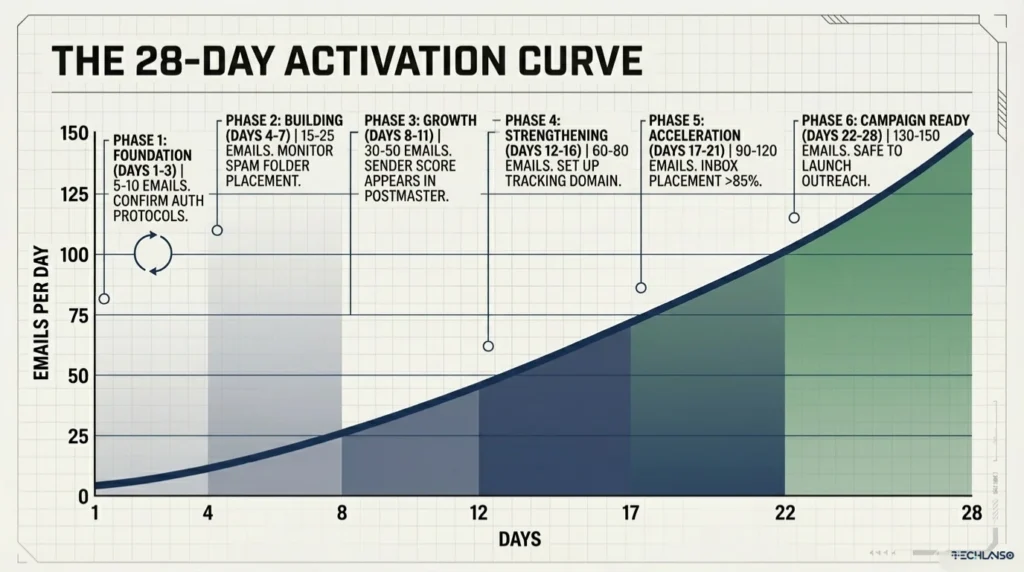
The table below is the recommended ramp-up schedule for how to warm up email domain over 28 days. Adjust the numbers based on your target campaign volume. Never skip days or jump volumes by more than 25% in a single step.
| Day Range | Warm-Up Emails Per Day | Phase | Notes |
|---|---|---|---|
| Days 1 to 3 | 5 to 10 | Foundation | Confirm SPF, DKIM, and DMARC are active before day 1. |
| Days 4 to 7 | 15 to 25 | Building | Monitor spam folder. If warm-up emails land in spam, do not accelerate yet. |
| Days 8 to 11 | 30 to 50 | Growth | Sender score should start showing in Google Postmaster Tools around this point. |
| Days 12 to 16 | 60 to 80 | Strengthening | Set up your custom tracking domain now. Begin lead list verification. |
| Days 17 to 21 | 90 to 120 | Acceleration | Inbox placement rate should be at or above 85%. If below, slow the ramp. |
| Days 22 to 28 | 130 to 150 | Campaign Ready | Domain is ready for cold outreach. Keep warm-up running alongside campaigns. |
Email Warm-Up Schedule Note: These figures follow industry best practices for warming up email domains. Actual thresholds vary by inbox provider, domain age, and sending setup. Let your sender score data guide when you accelerate, not just the calendar.
Real-World Warm-Up Example: A Freelancer’s First Campaign
This example shows what it looks like in practice when you follow the correct process for how to warm up email domain before your first campaign. It follows a freelance digital marketer setting up cold outreach for the first time.
The Setup
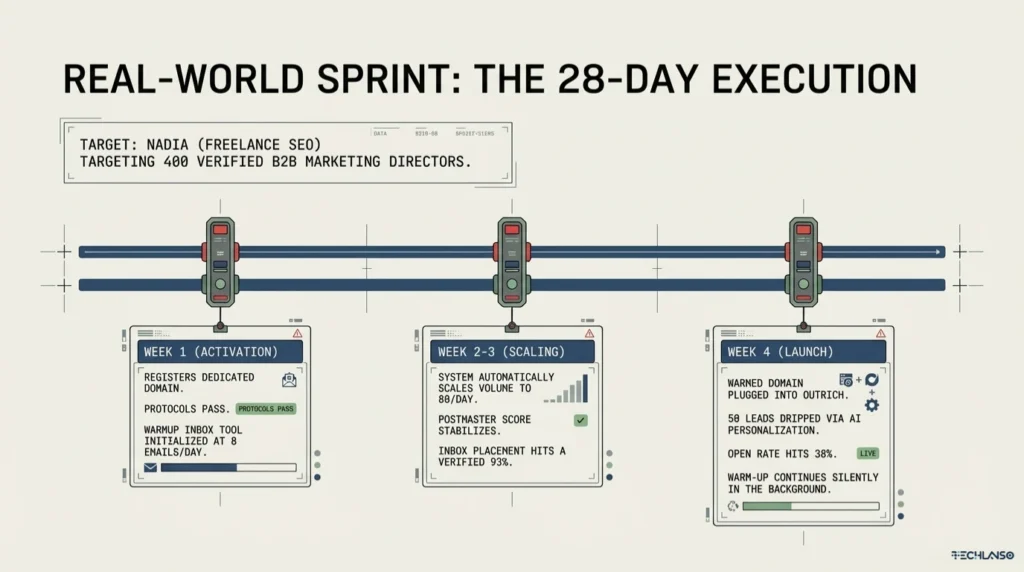
The freelancer, Nadia, offers SEO consulting services. She wants to reach B2B marketing directors at mid-size e-commerce brands. She has a lead list of 400 contacts sourced from LinkedIn Sales Navigator and verified through NeverBounce. Her outreach platform is Outrich, which she uses for AI lead enrichment, email writing, and campaign management.
Week 1: Authentication and Warm-Up Start
Nadia registers the domain nadia-seo.com and sets up Google Workspace. She adds SPF, DKIM, and DMARC records and confirms they pass using MXToolbox. She then connects the account to Warmup Inbox. The tool starts sending 8 warm-up emails per day within its network. Nadia checks Google Postmaster Tools and sees her domain is registering with a low but clean sender score.
Weeks 2 and 3: Ramp-Up
The warm-up tool raises daily volume based on Nadia’s ramp-up schedule. It sends 20 emails by day 8, 50 by day 12, and 80 by day 17. Her Postmaster dashboard shows the sender score rising. Inbox placement rate is at 91%. She sets up a custom tracking domain and connects her warmed account to Outrich. She does not activate any campaign yet.
Week 4: Campaign Activation
By day 22, Nadia’s sender score is 87 out of 100 and inbox placement is holding at 93%. She activates her first Outrich campaign for 50 contacts. The AI enriches each lead profile, writes a unique opening email, and queues a three-step follow-up sequence. She keeps Warmup Inbox running in the background. After five days, she has a 38% open rate and 6 positive replies. To see how Outrich handles this full workflow, the Outrich AI lead generation review covers it in full detail.
| Want to run outreach like Nadia at a fraction of the cost of an SDR?Outrich handles AI enrichment, writing, sequences, and replies in one platform Get Outrich at the launch price |
Email Warm-Up Mistakes That Destroy Deliverability
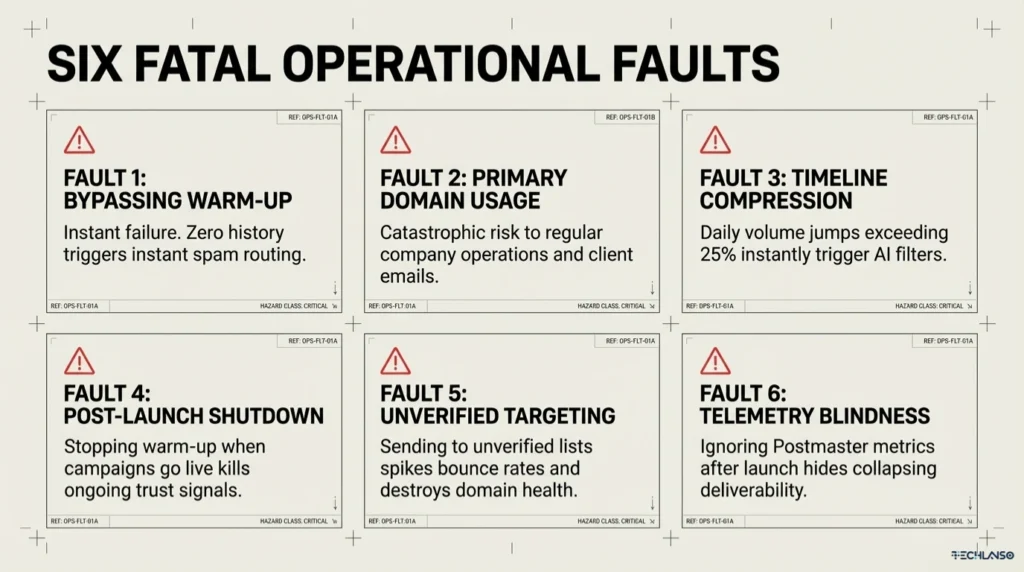
These are the most common mistakes that cause warm-up to fail or campaigns to under perform. Avoiding these errors is just as important as knowing how to warm up email domain correctly in the first place.
Mistake 1: Skipping Warm-Up Entirely
This is the most frequent mistake. Many first-time cold emailers assume that because their account is set up correctly they can start sending right away. A new domain with zero sending history will trigger spam filters the moment it sends more than a few emails in a day. There is no shortcut around this.
Mistake 2: Using Your Main Business Domain
Sending cold outreach from yourcompany.com is a high-risk approach. If your outreach domain gets blacklisted, your regular emails such as order updates, client notes, and support replies can be affected too. Always use a separate domain or subdomain for cold email.
Mistake 3: Compressing the Warm-Up Timeline
Trying to finish a four-week warm-up in ten days by jumping volume too fast creates an unnatural sending spike. Inbox provider algorithms flag this immediately. The ramp-up schedule must be gradual. A volume jump of more than 25% in a single day is a risk signal.
Mistake 4: Stopping Warm-Up When Campaigns Go Live
This is the most overlooked mistake among experienced cold emailers. Warm-up should not stop when campaigns launch. It should continue alongside active campaigns. The ongoing positive signals from warm-up are part of what keeps your sender score strong over time.
Mistake 5: Sending to an Unverified Lead List
Even after a clean warm-up, sending to a list with 5% or more invalid addresses will spike your bounce rate and damage your domain health score fast. Lead verification is required before every campaign, not just the first one.
Mistake 6: Ignoring Sender Score After Launch
Many senders warm up correctly but stop monitoring once campaigns are live. Sender scores change. A spam complaint, a bounce rate spike, or a change in send volume can all cause a score drop that goes unnoticed until deliverability has already collapsed.
Key Deliverability Metrics to Track During Warm-Up
These are the six metrics you need to track when you learn how to warm up email domain and after your campaigns go live. Use Google Postmaster Tools, Mail-Tester, or GlockApps as your main monitoring dashboard.
| Metric | What It Measures | Healthy Range | Action If Below Benchmark |
|---|---|---|---|
| Inbox placement rate | Share of emails reaching the inbox vs spam or promotions | Above 85% | Pause campaign. Extend warm-up. Review content for spam triggers. |
| Sender score / domain health | Overall trust level of your sending domain | Above 80 out of 100 | Slow ramp-up. Check for blacklist entries. Review bounce rate. |
| Bounce rate | Share of sent emails that cannot be delivered | Below 2% | Stop campaign. Re-verify lead list. Remove invalid addresses before resuming. |
| Spam complaint rate | Share of recipients marking your email as spam | Below 0.1% | Review email copy and targeting. Fix unsubscribe handling right away. |
| Open rate (post-launch) | Share of delivered emails that get opened | 30% to 50% for targeted campaigns | Review subject lines. Check inbox placement. Test Spintax variations. |
| Reply rate (post-launch) | Share of delivered emails that receive a response | 5% to 15% for cold outreach | Review personalization, offer relevance, and follow-up sequence structure. |
For a full breakdown of open rate and reply rate benchmarks by industry, the InstantlyClaw review and walkthrough covers deliverability performance across different campaign types.
Signs Your Domain Is Blacklisted and How to Recover
Even when you follow the correct steps for how to warm up email domain, deliverability problems can still happen. Here is how to spot a domain blacklisting and what to do about it.
Signs of Domain Blacklisting
- Open rates drop from 30% or higher to under 5% with no change in campaign settings
- Bounce rates spike above 10% on a previously clean list
- Recipients say they never received your email even though your system shows it was delivered
- Google Postmaster Tools shows your domain health score dropping to Low or Bad
- MXToolbox shows your domain listed on one or more public blacklists
How to Check for Blacklisting
Run your sending domain through MXToolbox’s blacklist check tool, which checks against over 100 blacklists at once. Also check Spamhaus, the most widely used blacklist in the industry. Google Postmaster Tools will also show if your domain is flagged within Gmail’s filtering system.
Recovery Steps
- Pause all active outreach campaigns right away
- Find which blacklist has flagged your domain using MXToolbox
- Submit a removal request through that blacklist’s removal portal (each blacklist has its own process)
- Clean your lead list by removing all bounced, complained, and unsubscribed addresses
- Return to warm-up only mode for two weeks before resuming any campaign activity
- Review your email content for spam trigger words and remove them
- Make sure all unsubscribe requests are handled right away and on auto
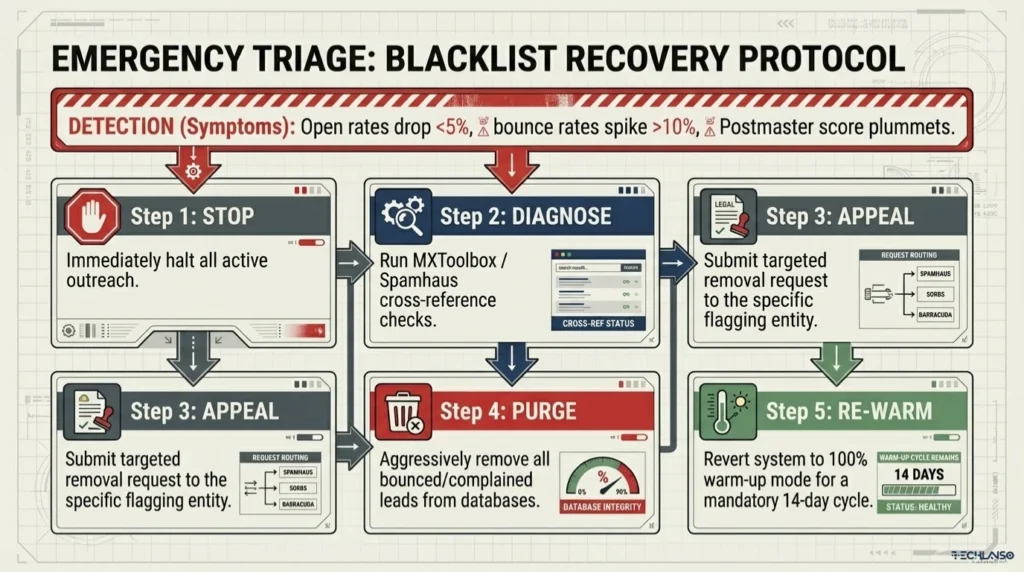
Recovery Timeline: Most blacklist removals take 24 to 72 hours after a successful removal request. Spamhaus can take up to 7 days. Domain health score recovery in Google Postmaster Tools usually takes one to two weeks of clean sending behavior after blacklist removal.
Email Warm-Up Checklist: Complete Pre-Launch Verification
Use this checklist before activating any cold email campaign. Every item must be confirmed before a single campaign email goes out. This covers everything you need to verify once you know how to warm up email domain and are ready to launch.
Domain Setup
- Separate sending domain registered (not your main business domain)
- SPF record added and validated
- DKIM record added and validated
- DMARC record added (minimum p=none to start)
- Custom tracking domain configured
Email Account Setup
- Google Workspace or Microsoft 365 account created on the sending domain
- Professional email signature added
- Profile photo and account details completed
Warm-Up
- Warm-up tool connected and configured
- Ramp-up schedule set (gradual, no volume spikes above 25% per day)
- Minimum 14 days warm-up completed (28 days for domains under 30 days old)
- Warm-up set to keep running after campaign launch
- Sender score confirmed above 80 before campaign activation
- Inbox placement rate confirmed above 85% before campaign activation
Lead List and Campaign
- Lead list verified through NeverBounce, ZeroBounce, or an equivalent tool
- Campaign set to drip sending (not batch sending)
- Sample AI-written emails reviewed for accuracy, tone, and personalization
- Unsubscribe handling configured and tested
- Monitoring dashboard active (Google Postmaster Tools and Mail-Tester)
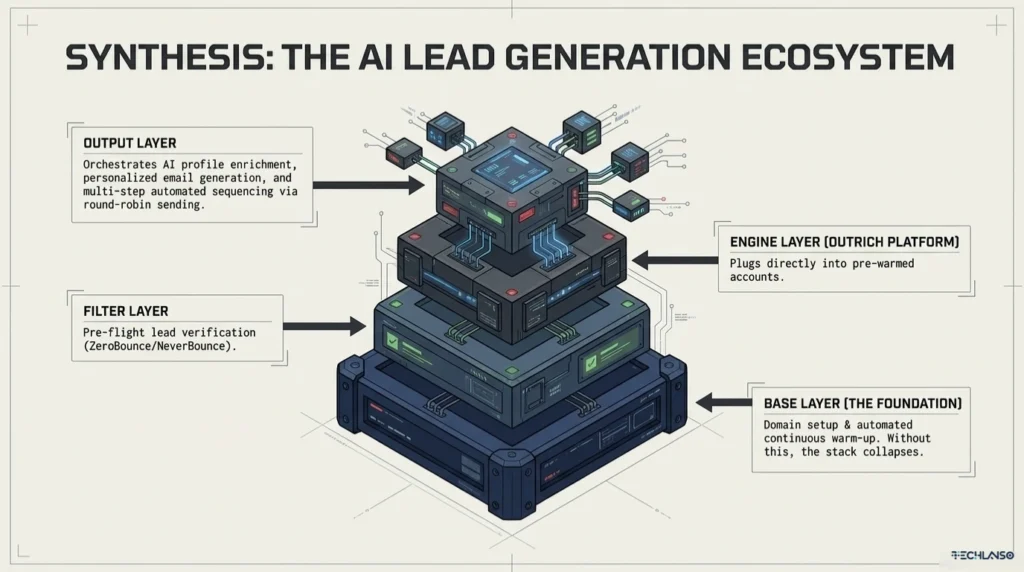
How Email Warm-Up Fits Inside a Full AI Lead Generation Workflow
Email warm-up is not a standalone activity. It is one key step inside a broader email warm-up process that connects domain setup, lead sourcing, AI enrichment, campaign activation, and ongoing monitoring. Once you know how to warm up email domain properly, you can build a system that runs well over time, not one that works once and then breaks down.
| Workflow Stage | What Happens | Warm-Up Role |
|---|---|---|
| 1. Target definition | Define ideal prospect by industry, title, company size, and region | Comes before warm-up. No domain action yet. |
| 2. Lead sourcing | Gather prospects from LinkedIn Sales Navigator, Apollo.io, ZoomInfo, or directories | Comes before warm-up. No domain action yet. |
| 3. Domain setup | Register sending domain, configure SPF/DKIM/DMARC, create email account | Warm-up starts here. |
| 4. Warm-up period | Run automated warm-up for 2 to 4 weeks. Monitor sender score. | Warm-up is the main activity. |
| 5. Lead verification | Verify lead list to remove invalid addresses and bounces | Run during weeks 3 to 4 of warm-up. |
| 6. Platform setup | Connect warmed accounts to Outrich or your chosen outreach platform | Warm-up must be complete before activation. |
| 7. Campaign activation | Launch AI-enriched, personalized campaign with multi-step sequences | Warm-up continues in the background. |
| 8. Monitoring | Track sender score, inbox placement, open and reply rates weekly | Ongoing. Warm-up runs indefinitely. |
Platforms like Outrich are built to work within this workflow. Once your accounts are warmed, Outrich takes over. It enriches each prospect with AI research, writes a unique personalized email for every contact, manages multi-step follow-up sequences, detects and responds to replies on auto, and rotates sends across multiple accounts to maintain safe daily volumes. The warm-up builds the foundation. Outrich builds the campaign on top of it.
For a full view of how AI lead generation platforms compare in 2026, the best lead generator tools guide covers Outrich alongside Hunter.io, Apollo.io, Instantly.ai, and Lemlist with feature-by-feature comparisons.
If you are looking at the full AI sales automation space, the AI Sales Rocket review for 2026 and the Synapse AI review are useful reads for understanding how AI tools are taking over different parts of the B2B sales pipeline.
| Get the full outreach stack, not just warm-up advice.Outrich: AI enrichment, email writing, sequences, and reply management in one platform Lock in Outrich at the launch price before it moves to subscription |
Frequently Asked Questions About Email Warm-Up
What is email warm-up?
Email warm-up is the process of slowly raising the number of emails sent from a new or inactive account before using it for cold outreach. The goal is to build a positive sender reputation so your emails land in the inbox rather than spam.
How long does email warm-up take?
Email warm-up takes two to four weeks for most new email accounts. Domains registered in the last 30 days should allow the full four weeks. Domains with an existing but inactive sending history may only need one to two weeks. Never rush the timeline. Rushing warm-up is one of the most common causes of campaign deliverability failure.
Is email warm-up necessary?
Yes. In 2026, email warm-up is a required step for any cold email campaign running more than 30 emails per day. Inbox providers use machine-learning filters that treat new domains with no sending history as potential spam sources. Without warm-up, campaigns from new domains fail deliverability checks regardless of content quality.
Does email warm-up work?
Yes, when done correctly. Warm-up works by creating the positive engagement signals, including opens, replies, and inbox rescues, that inbox providers use to judge sender trustworthiness. Senders who complete a proper warm-up consistently hit inbox placement rates above 85%, compared to near zero for new domains that skip the process.
What is a good sender score for cold email?
A sender score of 80 or above is generally enough to begin cold outreach campaigns. Scores between 70 and 79 are borderline. Proceed with caution and keep running warm-up. Scores below 70 signal deliverability problems that need to be fixed before launching any campaign.
How many emails can I safely send per day after warm-up?
For Gmail and Google Workspace accounts, the safe daily limit is 150 to 250 emails per account per day for cold outreach. For custom SMTP accounts, the limit varies by provider. Using multi-account round-robin sending across several warmed accounts is the best way to scale volume safely without pushing any single account past its threshold.
Can I warm up multiple email accounts at the same time?
Yes. Most automated warm-up tools support warming up multiple accounts at once. This is standard practice for agencies and outreach teams that plan to use multi-account round-robin sending. Starting all accounts at the same time means they are all ready when the campaign launches.
How do I warm up an email domain for free?
True automated warm-up at any real volume requires a paid tool. If you need to know how to warm up email domain for free, some platforms do offer limited free trials. Mailreach and Lemwarm both have trial options. Manual warm-up by sending real emails to real contacts is technically free but is not practical for generating the engagement signals that modern inbox filters require. For serious cold email campaigns, a paid warm-up tool is a necessary investment.
What is a warm-up email schedule?
A warm-up email schedule is a day-by-day plan that sets how many emails to send during the warm-up period. It starts at 5 to 10 per day and slowly rises to 130 to 150 per day over four weeks. The schedule is designed to ramp up volume in a way that looks like natural growth rather than a sudden surge that triggers spam filters.
Does Google have an email warm-up tool?
Google does not offer a dedicated warm-up tool. However, Google Postmaster Tools is Google’s free monitoring dashboard for domain and IP reputation, spam rate tracking, and delivery error analysis. It is the most important monitoring tool for anyone running cold email outreach from Google Workspace accounts. Set it up before warm-up begins.
What is the difference between warm-up and email verification?
Warm-up and verification are two different but related processes. Email warm-up builds your sending domain’s reputation by slowly raising volume and creating positive engagement signals. Email verification checks that the addresses on your lead list are valid and deliverable before you send to them. Both must be done before any campaign launches. Skipping either one causes different but equally serious deliverability problems.
What happens if I skip email warm-up?
Skipping warm-up on a new domain almost always leads to poor inbox placement, high bounce rates, spam filter flagging, and in serious cases, domain blacklisting that can take weeks to fix. Good email copy and a verified lead list cannot make up for the absence of sender reputation that warm-up provides.
Final Verdict: Warm-Up Is the Foundation, Not an Optional Step
Email warm-up is not a technical detail for advanced cold emailers. Knowing how to warm up email domain is the minimum requirement for any B2B outreach campaign in 2026. Inbox providers have raised the bar a lot. A new domain that skips warm-up will fail deliverability checks before a single prospect reads your message, no matter how well-written or well-targeted the campaign is.
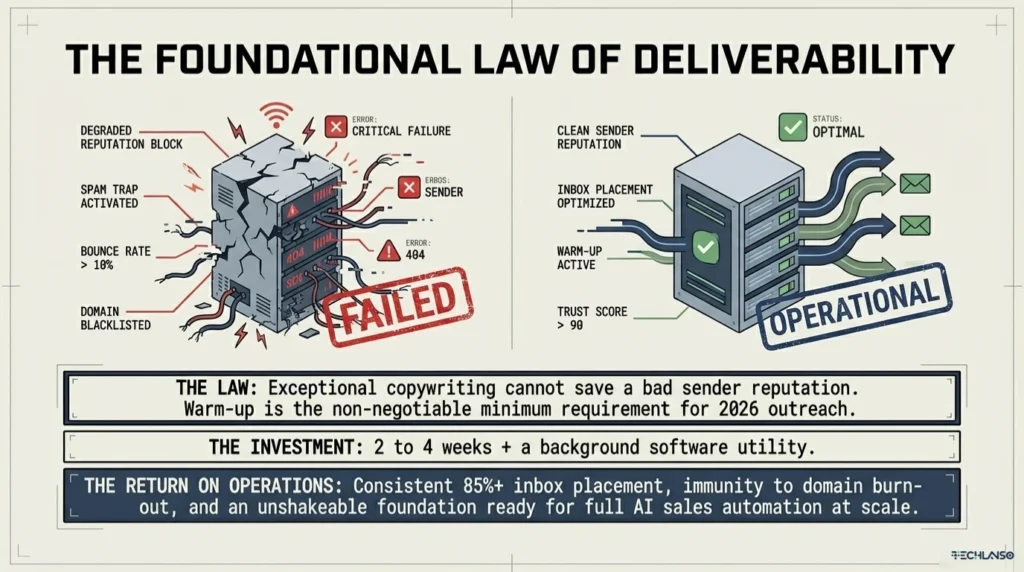
The investment is small: two to four weeks and the cost of an automated warm-up tool. The return is real: inbox placement rates above 85%, a sender score that holds up under high-volume sending, and a domain that stays clean across many campaigns rather than burning out after the first one.
Build warm-up into your outreach workflow as a permanent step. Set it up before your first campaign, keep it running, and let your sender score data tell you when you are ready to scale. When you are ready to build the full outreach stack on top of a properly warmed domain, Outrich is the most complete AI-powered lead generation platform in 2026 for agencies, B2B businesses, and freelancers who want results without hiring an SDR team.
| Your domain is warmed. Now build the campaign that closes deals.Outrich: AI enrichment, personalized emails, multi-step sequences, auto replies in one platform Get lifetime access to Outrich at the launch price |
ABOUT THE AUTHOR
Mozaherul Islam is an SEO Professional and Digital Marketer with hands-on experience planning and improving outreach and content strategies for AI tools, automation software, and digital marketing platforms. He has researched and reviewed cold email tools and deliverability practices as part of his work building affiliate content assets for Techlanso.com. Tools covered in this article were rated based on published feature docs, user review platforms including Google, Trustpilot, Capterra, and G2, and hands-on research into platform capabilities.
Disclosure: This article contains affiliate links. If you purchase through these links, Techlanso.com may earn a commission at no extra cost to you. All reviews and recommendations are based on genuine feature analysis and product research.